
A free tip tracker spreadsheet template

Download a free tip tracker CSV for Google Sheets, Excel or Numbers. It includes the columns and two example shifts; add the formulas below to calculate net tips, total earnings and hourly rate. Prefer logging on your iPhone? Tillside does those calculations as you save each shift, and you can still export your records to a spreadsheet.
Get the free spreadsheet template
Download the free CSV template
Open the CSV in Google Sheets, Excel or Numbers, then add the formulas below. No email address needed. The download contains example values, not working spreadsheet formulas.
Prefer to log on your iPhone?
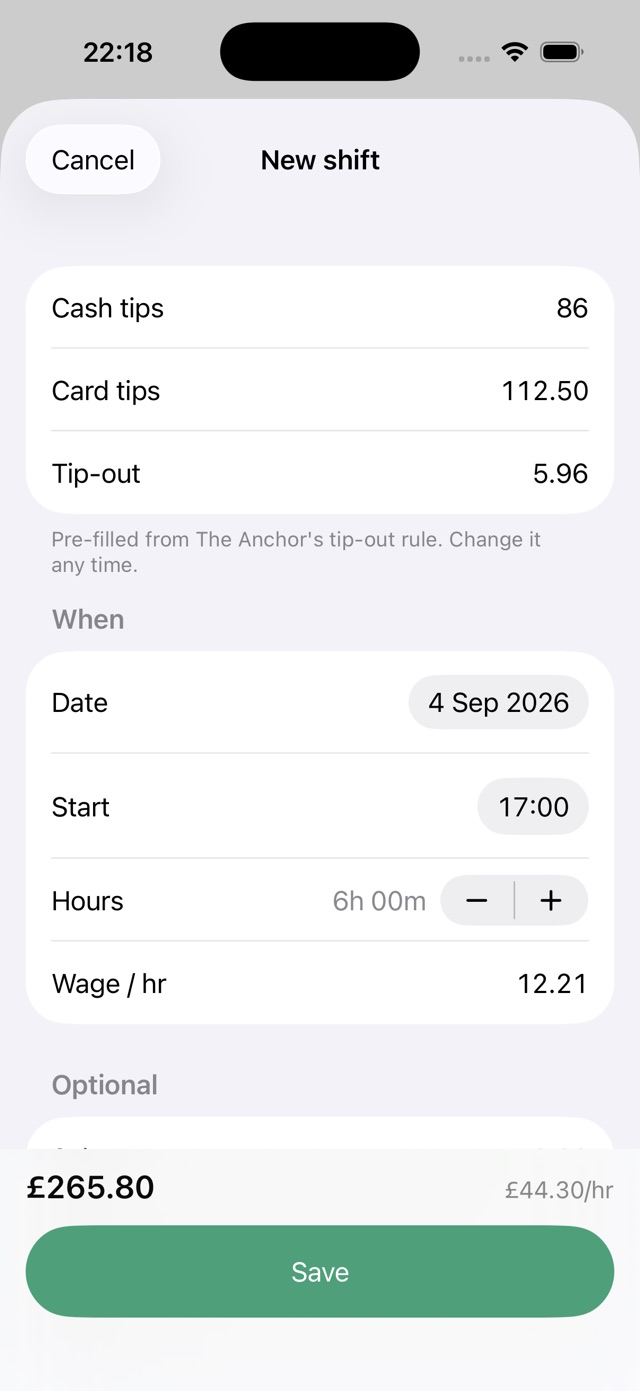
At the end of a shift, enter your cash and card tips, check the details and save. Tillside works out net tips, wages and hourly earnings for you. Export your entire history as a CSV whenever you need a spreadsheet. Start with your next shift: Tillside does not import your existing CSV, so keep that file for older records.
The template
Paste this header row into row 1 of a new sheet. Put one shift per row beneath it, oldest at the top.
date · job · start_time · duration_hours · wage_hourly · cash_tips · card_tips · tip_out · net_tips · wage_earnings · total_earnings · effective_hourly · sales · section · note · currency · timezone. These are exactly the columns Tillside exports, in the same order, so the two files line up.- Row 2 formulas, with the columns above in A to Q:
I2 = F2 + G2 − H2(net tips),J2 = E2 × D2(wage earnings),K2 = I2 + J2(total),L2 = IF(D2 > 0, K2 / D2, "")(rate). Fill down. Leave start_time, section, note, currency and timezone blank if you do not need them. - Weekly totals:
=SUMIFS(K:K, A:A, ">=" & start, A:A, "<=" & end)for earnings and the same with D:D for hours; divide one by the other for the week's rate. Do not average column L.
Rules that keep the sheet honest
- Enter tips before tip-out, and tip-out as its own amount. Net tips is a formula, never typed.
- Hours actually worked, to the quarter hour. Scheduled hours overstate your rate.
- One row per shift, even on a double. Two shifts on one day are two rows.
- Add the row the same night. A sheet that is three shifts behind becomes a sheet that is abandoned.
When a spreadsheet stops being worth it
Spreadsheets are good at the maths and bad at the entry. Adding a row on a phone at 1 a.m. means opening the app, finding the bottom, typing a date, and tabbing through ten cells with a keyboard that keeps switching between letters and numbers. If that makes you put off logging, a shift form may be easier to keep up with.
Tillside keeps the same fields and the same three formulas, but the date, start time, hours, wage and tip-out are already filled in from your job and your last shift. A normal night is cash, card, save. When you want the spreadsheet back, Settings then Export gives you a CSV of every shift, free, in exactly the columns above.
Questions about the template
Can I import my spreadsheet into Tillside?
No. Tillside exports to CSV but does not import one. If you start on the template and later switch, keep the spreadsheet for the old shifts and let the app take over from your next one; both files share the same columns, so a year-end total is one sheet pasted under the other.
Should I use one sheet per month or one long sheet?
One long sheet. Monthly tabs make weekly and yearly totals painful, and the whole point of the record is seeing patterns across months. Filter or pivot by month when you need it.
Related guides

How to keep track of tips as a server
What to write down after every shift, why net tips matter more than gross, and how to make tracking your tips a 30-second habit.
Read the guide
How to track tips for taxes
The daily tip record the IRS asks tipped workers to keep, how long to keep it, and how to export a clean year of shifts from Tillside.
Read the guide
Hourly Wage + Tips Calculator (After Tip-Out)
What did you earn per hour? Enter tips, wages and hours. This free calculator subtracts tip-out and shows total earnings and your hourly rate.
Read the guide
Best tip tracker apps for servers: a comparison
Compare Tillside, ServerLife, TipSee and a spreadsheet: free features, ads, backups and limitations. Find the right way to track your shifts.
Read the guideCanonical: https://tillside.co/guides/tip-tracker-spreadsheet-template/