
Which tip tracker fits your working week?

Choose Tillside for an ad-free iPhone ledger with free full-history export. Consider ServerLife if scheduling and income goals matter to you. TipSee offers advanced features free with ads. A spreadsheet gives you control over your columns and formulas. The right choice depends on what you need after a shift, not a universal winner.
How do the options compare?
Written by Forge 9 Labs, the maker of Tillside. This is a comparison of published features, checked on 20 September 2026, not an independent hands-on ranking. Competitor features come from their own websites and US App Store listings; confirm the offer in each app before paying.
| Option | A good fit for | Cost and limits |
|---|---|---|
| Tillside | iPhone users who want no ads, no account and free full-history CSV export. | Free: one job and 30 days on screen. Pro: monthly, yearly or lifetime. See prices for your App Store country. No Android app or CSV import. |
| ServerLife | Workers who want a shift schedule and income goals alongside their tip record. | Free download with in-app purchases. Its App Store listing has several premium prices; check the current in-app offer. |
| TipSee | Workers willing to see ads for access to advanced tracking features. | Free with ads; its description lists US$4.99/month or US$24.99/year for ad-free access. Confirm in-app pricing. |
| Spreadsheet | People who want custom columns and are happy to maintain formulas and copies. | Our CSV template is free. Spreadsheet software and cloud storage may have separate terms or costs. |
When is Tillside the right choice?
Tillside is an iPhone tip tracker for servers and bartenders. It records cash tips, card tips, tip-out, wage and hours, then calculates net tips and effective hourly earnings. Logging and full-history CSV export are free. There are no ads or Tillside accounts.
The trade-offs are specific: the free screen shows 30 days and one job; full history, Insights and multiple jobs need Pro. There is no Android app, rota planner, payroll service or CSV import. If you already have years of data in another app, keep its export before switching. Tillside cannot import that history.
For the calculations, see how tip-out works and how to calculate your hourly wage with tips.
What does logging a shift in Tillside look like?
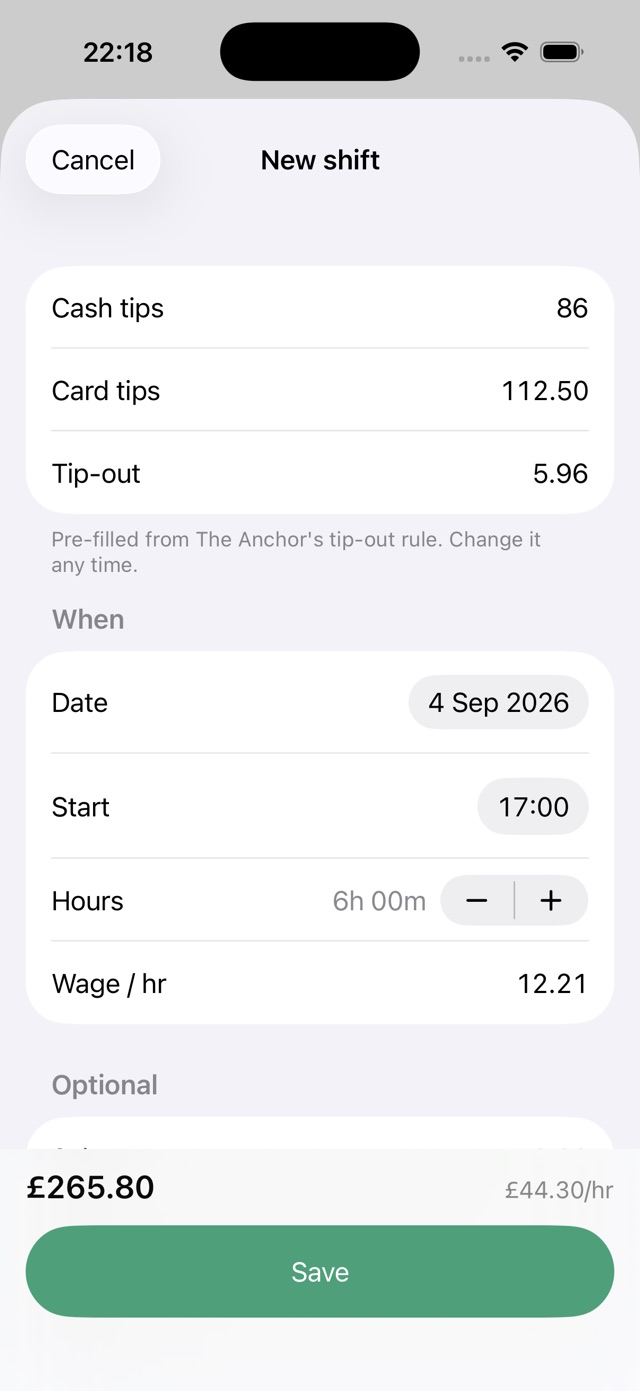
Set up your job with its hourly wage and tip-out rule. At the end of a shift, check the date and hours, enter cash and card tips, and adjust the tip-out to what you actually paid. Save the shift to see it alongside the rest of your week.
The screenshot below shows the actual entry form with example data. Your figures stay in your own record. You can export all logged shifts from Settings, including shifts older than the free screen’s 30-day window.
When should you consider ServerLife or TipSee?
ServerLife’s feature page describes schedules, calendar sync, goals and income charts, with cloud storage accessed through a login. Those are useful reasons to choose it if planning future shifts matters as much as recording completed ones. Its US App Store listing includes multiple purchase options, so this guide does not label one as the price every new customer will receive.
TipSee’s listing describes local storage, automatic email backups, multiple jobs, hourly wage and tip-out tracking. It offers advanced features with ads, plus paid ad-free subscriptions. That can suit someone who values a broader free feature set more than avoiding ads. Test its backup process before depending on it.
Is a spreadsheet enough?
A spreadsheet is a reasonable choice if you log at a laptop, want custom fields or already keep your budget there. It also makes your formulas visible. The work is maintaining those formulas, entering each shift and keeping a separate backup. Start with the free tip tracker template.
An app is useful when the obstacle is remembering to log after work. Pre-filled job details, a quick entry form and an optional reminder remove repeated steps. Try a week of each before deciding; neither approach helps if the record is incomplete.
How should you test a tracker before switching?
Use the same sample shift in each app: 6 hours, $12 hourly wage, $40 cash tips, $120 card tips and $24 tip-out. Net tips should be $136, total earnings $208 and the effective hourly rate about $34.67 before taxes. These are illustrative inputs, not earnings predictions.
- Check whether the free tier covers your number of jobs and the history you need.
- Export a sample record and open the file. Check that dates, amounts and hours are understandable.
- Check where the data is stored and how recovery works. Sync is not an independent backup: deletions can sync too.
- Keep a separate export before deleting an old app. For record-keeping basics, read what to record after each shift.
Questions about choosing an app
Which tip tracker has no ads?
Tillside has no ads on its free or paid tiers. TipSee describes an ad-supported free option and paid ad-free plans. Check the current offer in any app before subscribing.
Can I import my old tip records into Tillside?
No. Tillside exports a CSV of your full history but does not import CSV files from another app. Keep your old export and start a new record in Tillside if you decide to switch.
Related guides

How to keep track of tips as a server
What to write down after every shift, why net tips matter more than gross, and how to make tracking your tips a 30-second habit.
Read the guide
Free tip tracker spreadsheet template
A free tip tracking layout for Google Sheets or Excel: the columns, the three formulas, a CSV download, and when a spreadsheet stops being worth it.
Read the guide
How to track tips from two jobs
Tracking tips across two jobs: separate wages and tip-out rules, comparing hourly rates per job, and keeping one export for tax time.
Read the guide
How to track tips for taxes
The daily tip record the IRS asks tipped workers to keep, how long to keep it, and how to export a clean year of shifts from Tillside.
Read the guideCanonical: https://tillside.co/guides/best-tip-tracker-app-for-servers/